Contrast, legibility, safe zones: the 5 mistakes in social graphics
4.5:1 contrast, 250 pixels at the top and 350 at the bottom of a Story, 170 words, three fonts: five mistakes in social graphics that come with a number instead of an opinion.
By Tobias Schäfer · ← All posts
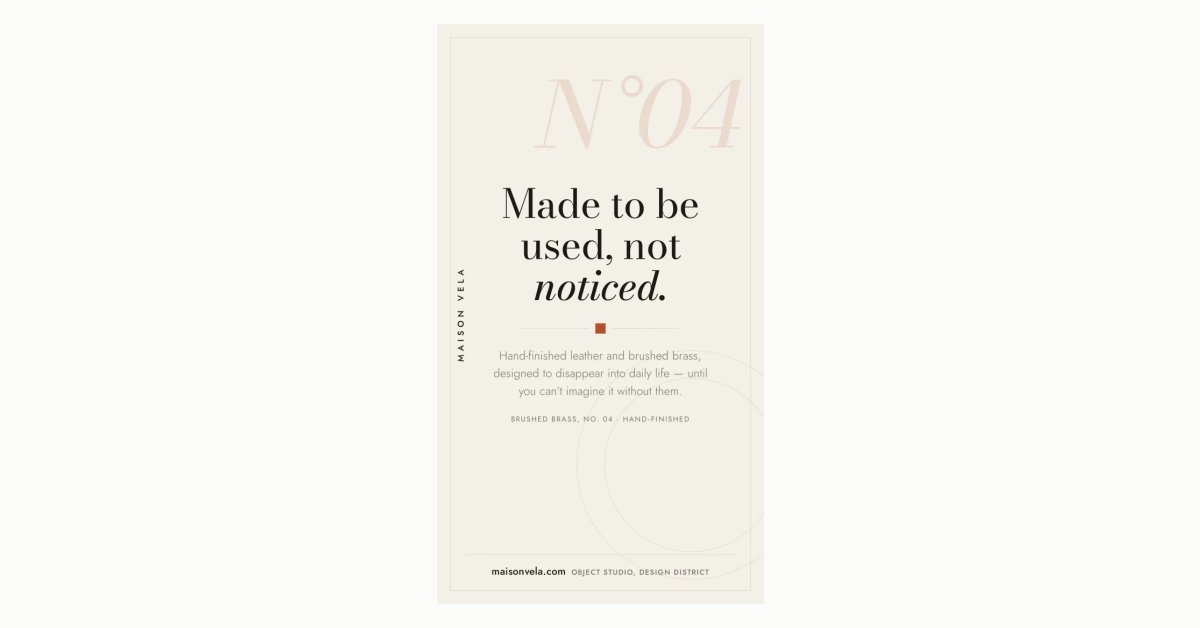
Most arguments about social graphics are about taste. Five things aren't, because each of them has a number: contrast, the UI zones of Stories and Reels, the amount of text, the number of fonts, and the edge of the canvas. A browser can check all five without anyone having an opinion about them.
We did that for our own templates for the first time in early August. Of eight hand-built Story layouts, eight failed.
1. Contrast below 4.5:1
Grey on white looks fine on your own monitor. Good screen, dim room, and the graphic fills half of it. On a phone, outdoors, at half brightness, the same line is gone.
WCAG 2.1 sets a limit for this: 4.5:1 for normal text and 3:1 for large text. Large means 24 pixels and up, or 18.66 pixels and up if the type is bold. The ratio is calculated from the relative luminance of the two color values. So it's arithmetic, not an estimate. Stay below it and you lose some of your readers on exactly the line you cared about.
The catch is text over a photo or a gradient. There's no single background value to read, and the measurement has nothing to say. In our pipeline that case goes to a vision model that looks at the screenshot, and a judgement can be wrong. Until 4 August the whole contrast check worked that way. Since then the checklist says explicitly that a measured value must not be judged again.
2. Text in the Story and Reel UI zones
In a Story, Instagram lays its own elements over the image: the profile row and progress bar at the top, the reply field and actions at the bottom. We reserve 250 pixels at the top and 350 at the bottom. Of 1920 pixels of height, that leaves 1320.
What gets measured is the band the letters actually occupy, not the box around them, and for a practical reason. A line box is taller than its letters. 30-pixel type in a 45-pixel line carries 15 pixels of air, and if you measure the box you report errors nobody can see in the image. An error is raised once more than 20 percent of an element's letter height sits inside the reserve.
On the first run, all eight Story templates had exactly this problem. Mono Minimal had an 84-pixel bottom margin, which put the line with the domain right in the area where Instagram later puts its reply field. Today it's 400 pixels. The person who built these templates knew about safe zones, and that rather proves the point: knowing the margins and checking them are two different things.
The feed has no such reserve, so feed formats pass a 0. Copy Story margins onto a 4:5 post and you give away a third of the canvas without anything covering it. There's more on this in the guide to Instagram image sizes.
3. More than 170 words
170 words per canvas, or per slide in a carousel. The number isn't a guess. We counted the words in our 32 hand-built templates, the highest was 162, and rounding up gives 170. A limit that your own work fails is the wrong limit.
Even so, 170 is a lot for a canvas that gets one or two seconds in the feed. If you reach the limit, you've put a paragraph on a poster.
Only text that someone is meant to read counts. Mono Minimal has a 300-pixel "N°04" at 13 percent opacity in the background. Anything under 30 percent effective opacity counts as texture and drops out of both the word count and the contrast check, because deciding whether an almost invisible letter is meant to be read would be a judgement again.
4. Four fonts
Three font families per document, counted by the first family the browser resolves for each element. More than that reads as messy. Two are almost always enough, one for the headline and one for everything else: Mono Minimal gets by with Bodoni Moda and Jost, and that's closer to the rule than the exception.
5. Clipped text nobody counts
There are four kinds. Text that runs past the edge of the canvas: the screenshot is taken at exactly the export size, so anything outside simply isn't in the image. Text that overflows a container that hides its overflow. Text whose own box is smaller than its content. And text under an opaque shape.
The last case was a judgement call for a long time, and here's how that went. In a finished Story, a fully opaque triangle sat on top of the kicker line. It read "AUSBILDUNG BEI AMP" (German for "apprenticeships at AMP") and then nothing. The vision model had approved the graphic. Today a shape counts as opaque at 90 percent opacity or more, and it's reported as soon as it covers a quarter of the sample points on the letters.
What still gets through
A colored bar across two lines of text passes every one of these checks. We saw it in a 4:5 render, probably a highlighter effect at the wrong height. The text was on the canvas, inside its box, opaque enough and with enough contrast. A shape painted over letters without covering them by the 90 percent rule fits none of the categories, and that's still open.
Also, a measured warning isn't a fix. The errors go into the correction round, which runs one to four times depending on the plan. Whatever the last round changed still gets measured, but there's no round left to act on it. The log then says how many errors are going out uncorrected. That's unpleasant to read, and better than not knowing.
Templates that meet these numbers
The layouts are in the template gallery, each with its format. The eight Story templates there are the repaired versions, and a test renders them at 1080 × 1920 on every run and checks the reserve again, so the repair doesn't quietly get lost in the next redesign. Why these layouts are built by hand in the first place is explained in Why AI graphics all look the same.