Why AI graphics all look the same, and what to do about it
An image model returns the middle of its training data, and that middle looks the same for everyone. What a different output format changes, what a measuring browser checks, and what still goes wrong.
By Tobias Schäfer · ← All posts
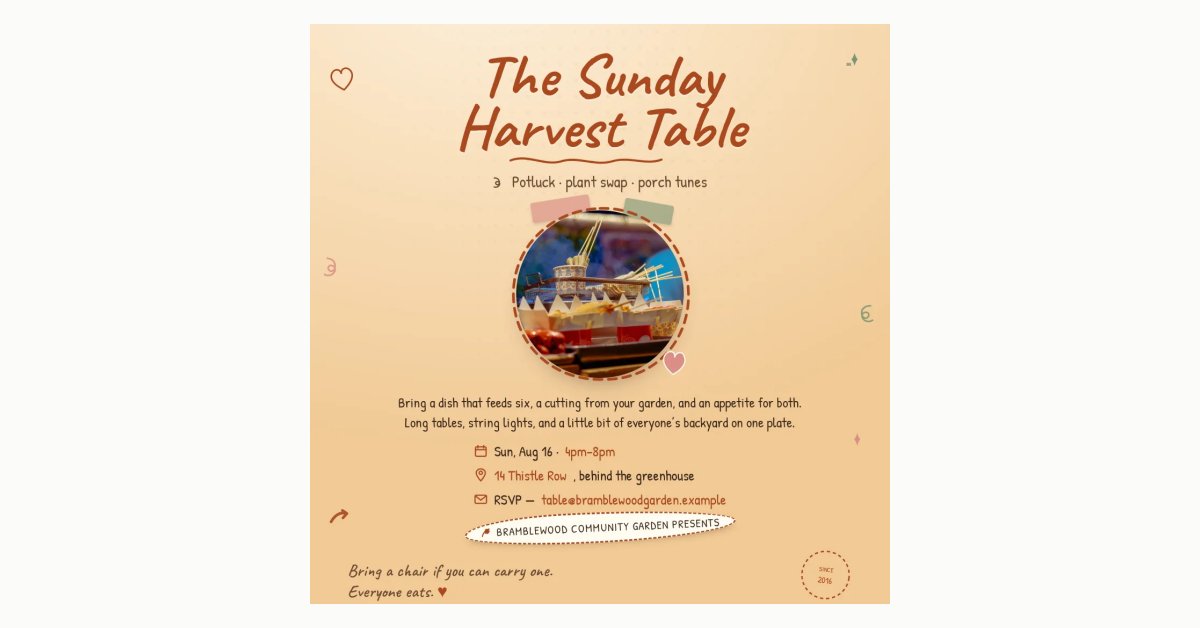
By now you can spot them in half a second. A purple gradient, a glow somewhere, and a centered sans-serif in the middle. With some bad luck there's also a word in the text that's almost spelled right. Most of it isn't ugly.
The problem is that it's interchangeable. In the feed, a graphic has exactly one job: to be recognizable in the moment a thumb swipes past it. A graphic that looks like the tool instead of the company works against that job. And when two competitors use the same tool, three businesses end up sharing one look.
An image model returns the middle of its training data
Image models are trained to turn noise into something plausible. Plausible, here, means close to what showed up often in training. For a social media graphic, the most common layout is a centered headline on a dark gradient, because there are millions of them. The model isn't doing anything wrong. It returns the middle of the distribution, and anyone who asks for the same middle gets the same picture.
Then there's the text. An image model paints letters the way it paints trees: as shapes that look like letters. The models have got a lot better at this, but a sign with one word on it is a different thing from six lines of body copy in a specific house font. And to a pixel generator, an edge isn't a category at all, which is why the bottom line sometimes sits half outside the image.
Our model writes HTML
What Postmint produces is an HTML document with CSS. A real browser renders it at 1080 × 1350, or one of the other five formats, and takes a screenshot. The text in it is real text in a real font. So it's spelled correctly, because nobody had to paint it, and it has a box with measurable edges.
The starting point is 32 hand-built layouts. One of them is almost monochrome and lives on fine rules; another is a pastel flyer with hand-drawn doodles. From the chosen template, the model takes how color is used, flat or as a gradient, and how much of the canvas it covers. The color values themselves come from the brand kit. A template whose gradient is rebuilt in your own brand colors looks like your brand. The same template in its original colors looks like a template.
Measured is not the same as judged
After rendering, the browser reads the finished document and reports eight kinds of error by name. Five are about geometry: text outside the canvas, text clipped by its container, a box too small for its content, text under an opaque shape, two text blocks overlapping. Then there's the WCAG contrast of a text color against a flat background, text in the Story and Reel UI zones, and two density limits, 170 words per canvas and three font families. Behind them are rectangles, edges, overlap areas, and opacity and luminance values from the DOM. An error like that is either there or it isn't, and there's nothing to argue about. The numbers behind them are in the post on the five mistakes in social graphics.
Color, hierarchy and contrast over a photo or a gradient work differently. A vision model gets the screenshot, along with the brief, the template and the brand's color values, and can send the whole thing back. Depending on the plan there are one to four of these rounds. That stays a judgement, and a judgement can be wrong.
That's why we never say anywhere that brand colors are applied in code. Exactly two things happen deterministically in code: the logo is inserted and photos are inserted. Nothing gets recolored.
What still goes wrong
Changing your brand kit doesn't recolor a finished graphic. There's no pass that applies a kit to existing HTML after the fact, and editing by description amounts to a search and replace that can miss the largest area in the image. Generating it again is the reliable way.
And the measuring pass only sees what's in its eight cases. In one 4:5 render, colored bars ran across two lines of text, probably a highlighter effect at the wrong height. The browser found nothing wrong: the text was in the image, inside its box, visible enough. A shape only counts as opaque from 90 percent opacity over a quarter of the sample points, and a thin bar stays below that. Both of these are in our internal fact list, and both are here too, because a tool that's meant to fight sameness would be off to a bad start if it kept quiet about its own gaps.
Where the 32 layouts are
They're in the template gallery, each with the format it was built for and the style it brings along. Which format is worth it when is in the guide to Instagram image sizes. A graphic takes about two minutes, correction rounds included.